
Right-to-left and bidirectional text
Stipple draws Hebrew, Arabic and text that mixes them with left-to-right
scripts. Text is always stored in logical order, the order it's typed and read.
When it's drawn, each paragraph goes through the Unicode Bidirectional
Algorithm (UAX #9), implemented by oxideav-scribe, and its runs are placed in
visual order.
use stipple::render::TextDirection;
use stipple::widgets::{label, paragraph};

// Direction detected from the first strong character: right to left here.
let hello = label(cx, "שלום, עולם");
// A paragraph forced right to left, whatever it starts with.
let note = paragraph(cx, "2024 היה שנה טובה").direction(TextDirection::Rtl);Paragraph direction
Every paragraph (text between \ns) has a base direction, set by
Element::direction:
TextDirection | Meaning |
|---|---|
Auto (default) | The paragraph's first strong character decides (UAX #9 rules P2/P3): a Hebrew or Arabic letter makes it right to left, a Latin, Greek, Cyrillic or CJK one left to right. No strong character means left to right. |
Ltr | Left to right. |
Rtl | Right to left. |
Element::direction on a stack or grid sets it on every text element inside.
With Auto, each paragraph of a multi-line text decides on its own.
The base direction decides where the line starts, how neutral characters
(spaces, punctuation) between runs of different directions resolve, and the
alignment: right-to-left paragraphs line up against the right edge of the text
element's box. A label sized to its text looks the same either way; a stretched
label, a wrapped paragraph, or the text in a text_field or text_area sits
on the right.
Shaping and wrapping
Each display line is cut into runs of one embedding level. Each run is shaped in logical order, so Arabic letters take their joining forms and ligatures form as usual, then the runs are placed left to right in visual order (rule L2). Brackets and other mirrored characters in right-to-left runs are drawn mirrored (rule L4). Numbers keep their left-to-right digit order inside right-to-left text.
Wrapping picks breaks on the logical text, at spaces, exactly as for left-to-right text; each wrapped line is then reordered on its own, with trailing spaces moved to the paragraph's end (rule L1).
Arabic joining comes from scribe, which substitutes the Arabic Presentation
Forms before looking glyphs up. Fonts that carry those forms (DejaVu Sans,
which Font::system_default adds as a fallback, Amiri) join correctly; a font
that only has the OpenType init/medi/fina features, such as Noto Sans
Arabic, shows isolated letters for now.
Editing
EditBuffer keeps the caret and selection as logical byte indices, so typing,
Backspace and Delete always act on the text's logical order: Backspace removes
the character typed last, whatever side of the caret it's drawn on.
- Arrow keys move visually. Left and Right step the caret to the next character edge on screen, so inside right-to-left text Left moves forward through the text. At a line's visual end the caret crosses to the previous or next line. Shift+Left/Right extends the selection the same way; Left or Right with a selection collapses it to its visual left or right end (taken from the line's direction).
- Word movement, Home and End are logical. Ctrl/Option+Left/Right move by words in text order, and Home and End go to the logical start and end of the line (the right and left edges of a right-to-left line).
- Where the caret is drawn. A caret sits at the leading edge of the character after it: the left side of a left-to-right character, the right side of a right-to-left one. At the end of a line it sits at the trailing edge of the last character. Where runs of different directions meet, one logical position has two possible places on screen; this rule picks one.
- Clicks land on the nearer edge of the character under the pointer and map to the logical index on that side of it: clicking the left half of a Hebrew letter puts the caret after it.
- Selection is a logical range, so in mixed text it can show as several rectangles on one line.
EditBuffer::set_direction sets the paragraph direction
for both editing and drawing; text_field and text_area pass it to their
text.
Custom drawing
Font::layout(text, size, direction, max_width) returns a TextLayout, the
same layout the widgets use. Draw it with Scene::fill_layout, and use
caret_position, index_at and selection_rects for a custom editor.
Scene::fill_text lays text out with TextDirection::Auto. In a mirrored
layout, use Font::layout_in(text, size, max_width, LayoutDirection::Rtl) to get the same
alignment the widgets get (see below).
Mirrored layouts
An app in Arabic, Hebrew or another right-to-left language usually wants the whole UI mirrored, not only its text: the first item of a row on the right, checkboxes right of their labels, sliders filling from the right. Set the theme's layout direction:
use stipple::prelude::*;

let app = App::new(state, view)
    .theme(Theme::light().layout_direction(LayoutDirection::Rtl));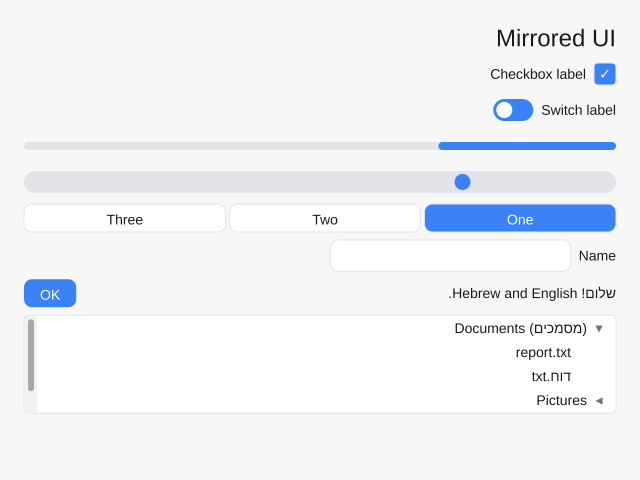
Without it, the App follows the user's language: the UI is mirrored when
the language it shows reads right to left
(LayoutDirection::for_language("ar-EG"): Arabic, Hebrew, Persian, Urdu,
Yiddish, Pashto, Sindhi, Kurdish, Uyghur, Dhivehi and a few more). The
language shown is the best match between the user's preferred languages
(platform::preferred_languages(), read from the OS on every platform) and
the ones the app says it ships with App::languages(["en", "he"]), or the
user's first language when the app doesn't say. A UI whose strings aren't
translated shouldn't flip, so an app shipping only English should say so
(App::languages(["en"])), or set the theme's direction, which fixes it
(Theme::follows_locale is then off). The direction changes while the app
runs when the user's languages do (see localization.md).
LayoutDirection::from_env() still reads LC_ALL, LC_MESSAGES and LANG
for code without an App.
Element::layout_direction(dir) sets the direction of one element and
everything inside it, and is inherited down the tree. Use
LayoutDirection::Ltr for a part of a mirrored UI that must keep its
orientation (media transport buttons, a chart, a phone number), or
LayoutDirection::Rtl for a mirrored panel in a left-to-right app.
What mirrors
A right-to-left element lays its children out as it would left to right, then reflects each child's box about its own middle. So in a right-to-left subtree:
- Rows run right to left, wrapped rows too (each line starts on the right).
Align::Starton a horizontal axis is the right edge andAlign::Endthe left one: a row's main-axis alignment, a column's cross-axis alignment, and a grid cell's horizontal alignment. Vertical alignment doesn't change.- Grid columns count from the right: column 0 is the rightmost.
- Padding's
leftinset is the start side, so it lands on the right (andrighton the left).Insetskeepsleftandrightnames; read them as start and end. - Text with
TextDirection::Autolines up against the right edge, whatever its own direction: a stretched Latin label, a text field's contents and its caret all start on the right. A paragraph with no strong character (an empty field, a number) gets a right-to-left base direction. Each paragraph's reading order is still detected from its characters, so "abc" still reads left to right. Text with an explicitLtrorRtlkeeps its own side. - Glyphs, images and anything drawn with a fixed orientation are never flipped. An image's left and right padding swap.
Widgets follow:
checkboxandradiosit right of their label, and aswitchleft of its label; a switch's knob is on the left when on.sliderandprogress_barfill from the right, and dragging a slider measures from the right edge.tabsandtoolbars start on the right;split_pane's first pane is the right one.treeindents from the right and its collapsed triangles point left (◄).- Menus Stipple draws: the menu bar starts on the right, a menu lines up with
its title's right edge, submenus open to the left of their item (their
arrows point left), and context menus open leftwards from the pointer.
selectdropdowns line up with the button's right edge, and toasts placed withAlign::Start/Align::Endswap sides. Overlays placed withAnchor::At(exact coordinates) andAnchor::Centerstay where they are. - Left and Right swap in a
tree(Left expands, Right collapses), asplit_pane(the divider moves the way the arrow points) and menus (Left goes to the next menu on the bar and into a submenu). Text editing keys don't change: Left and Right already move visually in text. - Under
Theme::native, switches, sliders and progress bars draw themselves in a mirrored UI, since the OS would draw them left to right. Other native controls are symmetric.
Drag handlers on a mirrored element get a mirrored DragMotion
(DragMotion::mirrored): x is measured from the right of the parent, so
fraction_x counts from the right edge and dragging left is a positive x
delta. A handler written for a left-to-right layout works unchanged. Pointer
positions given to tap and context handlers are real window positions.
Scroll bars mirror too: a vertical container's bar (and the gutter a classic
one keeps) is on its left, and a right-to-left sideways strip, which starts
at the right, has its thumb start at the right of its bar. A container
scrolling both ways (scroll_both) starts at the right: its content
overflows to the left, the vertical bar and the corner square are on the
left, the horizontal thumb starts at the right, and a horizontal arrow
button at the right steps back (towards the start). Layouts built from absolute positions (Anchor::At, custom
drawing) aren't mirrored; compute those from the window's right edge.
LayoutNode::rtl says whether a laid-out node was mirrored, and
stipple::core::layout_with_direction lays a tree out with a root direction
(layout is left to right). The bididemo --mirror example shows a
mirrored UI; CI checks it on X11, Windows and macOS.
Not done yet
- scribe's shaper doesn't report which characters each glyph came from, so in a run where glyphs and characters don't match one to one (a ligature such as lam-alef, or an Indic cluster) caret positions are measured from shaped prefixes, which can be slightly off inside the ligature.
- Up and Down in a
text_areakeep the byte column, not the visual x.